
 Live Chat

Choosing a Server on Android TV and Firestick
Introduction
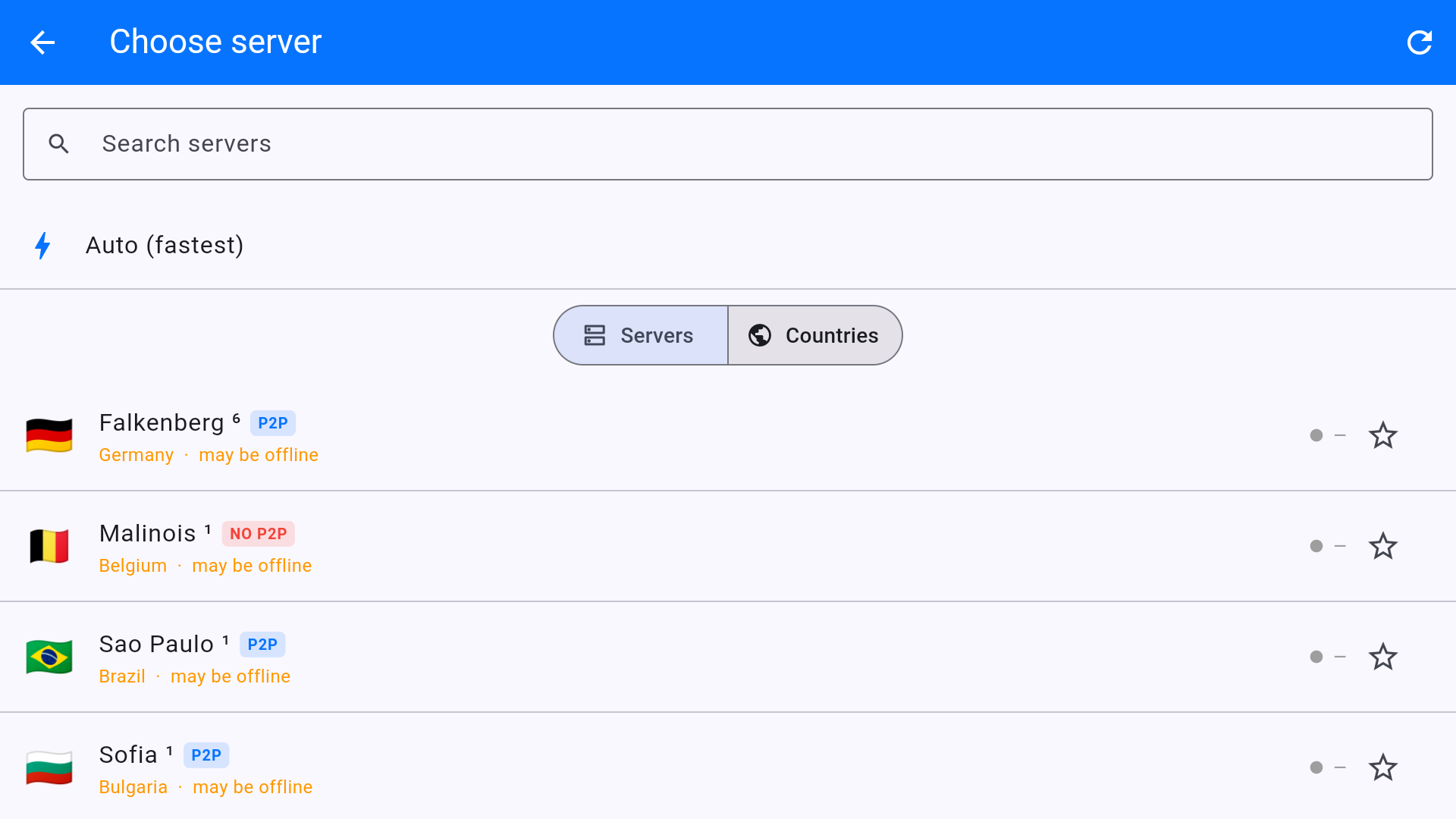
The TV app server list is built for a remote: search, Auto (fastest), Servers vs Countries, and badges for P2P and offline nodes.
How to pick
- From the home screen, highlight the location card and press OK.
- Start typing a city in Search servers, or switch to Countries.
- Press the circular arrow (top right) if pings are blank or everything says offline.
- Avoid rows with may be offline — they are not answering. Choose a live city.
- Star a server you use every night so it is easy to find.
Badges
- P2P — torrents allowed. Fine for general streaming too.
- NO P2P — do not use for file sharing (example: Malinois 1).
- 10GB — 10 Gbit node. Best for 4K on the TV.
- Auto (fastest) — lowest ping, which may not be the country your TV app wants.
For BBC iPlayer stay on a UK server even if ping is higher than a nearby EU node. For speed-only YouTube, Auto or a green-ping 10GB city is enough.
This article is also in the client area knowledge base.